Why Your Shopping Spreadsheet Falls Apart
Every big purchase starts in a spreadsheet and ends somewhere else. Here's the specific point where the sheet stops working, and what to do about it.
The short version
A shopping spreadsheet works for about three weeks. It fails not because it lacks features but for three specific reasons: it can't show you what you're buying, every row has to be typed by hand, and it treats a price as a number that was true once. Keep its structure (items, statuses, a budget, your own columns) and fix those three things.
Search for a way to organize a big purchase and you’ll find the same answer a hundred times over: a template. Home renovation budget templates for Excel. Shopping list and price tracker templates for Notion. Furniture trackers on Etsy, Google Sheets planners, a Reddit thread where someone shares the one they built for their kitchen.
That’s not a coincidence, and it isn’t a failure of imagination. It’s what happens when a lot of people need the same tool and nobody has built it, so everyone builds their own out of the most flexible thing at hand.
The spreadsheets work. That’s the part worth saying plainly. A column of items,
a column of prices, a SUM() at the bottom, and you have something no wishlist
app will give you. The trouble is that they work for about three weeks.
The three weeks
Here’s the arc, and if you’ve done this you’ll recognize every step.
Week one is great. You open a sheet. Item, price, link, store, status. You paste in eleven things, total them, and see the number. This is the moment the spreadsheet earns its reputation. You now know something you didn’t know before, which is what the room actually costs.
Week two, you add columns. Lead time, because the sofa is six weeks out. Room, because you’re doing two at once. Who’s paying. Whether it fits. Fabric. Each column is obviously necessary when you add it, and each one makes the sheet a little harder to read on a phone.
Week three, it goes stale. You’re in a store, you see the chair, and adding it means opening a spreadsheet app on your phone, scrolling sideways to find the right column, and typing a URL by hand. So you don’t. You screenshot it. Then you send yourself the link. Then you have eleven rows in a sheet and nineteen things in your camera roll and no idea which is current.
The sheet didn’t break. It just stopped being the place the information actually lives.
What the sheet is missing (and it isn’t features)
The instinct is to blame the tool for lacking something. But a spreadsheet has more features than any shopping app will ever have. What it’s missing is narrower and more specific than that.
It can’t see. You’re buying things that are, fundamentally, things you look at. A rug is not a row. When your list is text, you end up keeping a second, visual list somewhere else. A Pinterest board, a folder of screenshots, and now the plan is in two places that disagree.
Nothing fills itself in. Every row is manual. Title, price, store, link, all typed or pasted one field at a time. That’s a small tax per item and it is exactly the tax that stops you adding the nineteenth thing on your phone in a store.
It doesn’t know what a price is. A spreadsheet holds 1240 the same way it
holds a phone number. It can’t tell you that the rug was $1,180 in June, that
today’s “sale” is above its own average, or that the thing you’ve been waiting
on finally moved. To the sheet, a price is a number that was true once.
Those three are the whole gap. Everything else about the spreadsheet. The flexibility, the totals, the columns you invented: is genuinely good and worth keeping.
What to keep
If you take nothing else from this, take the structure. The people building these sheets have converged on a pattern that works, and it’s worth writing down:
- An item is a row, not a link. A link is a pointer to somewhere else. An item has a price, a state, and properties, and it belongs to you.
- Status beats deletion. Three states carry almost every project: something you’re considering, something you’ve decided on, and something you’ve bought. Deleting the ones you’ve ruled out loses the record of having ruled them out, and you will reconsider them in six weeks.
- A budget is a number you set once and check often. The value isn’t in the total; it’s in the distance between the total and the ceiling. “$4,755 of $6,500” tells you what to do next. “$4,755” doesn’t.
- The extra columns are the point. Lead time, room, who’s paying, whether it fits. That’s the stuff no generic app lets you record, and it’s usually the stuff that decides the purchase.
Any tool that takes those away in exchange for being prettier is a downgrade.
What Vurra does with it
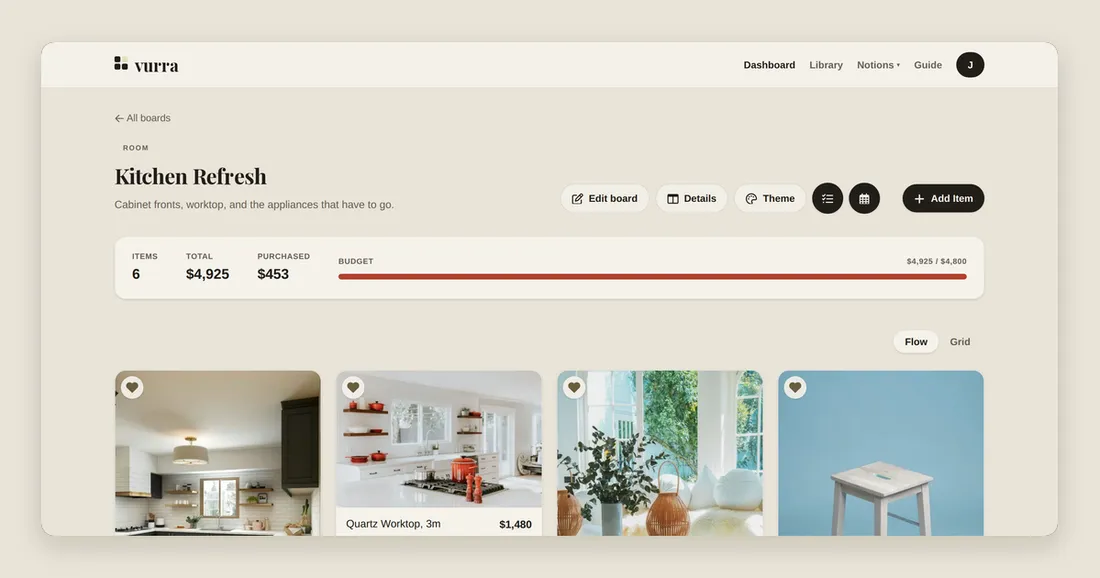
Vurra is that structure with the three gaps closed. A board is a list of real items: each one with a price, a status, a source link and whatever fields the project needs: laid out so you can see what you’re buying.
Paste a URL from any store and it pulls the title, the price and the picture, so adding the nineteenth thing costs one paste instead of six fields. Set a budget and the board keeps count against it. Mark the two or three items you’re waiting on and Vurra watches their prices and keeps the history, so a discount has something to be measured against.
The columns you invented survive as custom fields. Lead time is still lead time. Nothing forces your project into a shape someone else chose.
It’s the same plan you were already making. It just stops falling apart in week three.
Worth being straight about: Vurra is single-user today. If your project needs two people editing the same board, that isn’t built yet. One of you keeps the board for now.
Where to start
Don’t migrate everything. Pick the one project you’re actively spending money on, put its items in a single board, set the budget you actually have, and add the two or three fields you know you’ll need.
If it’s a room, start here. If it’s a first apartment, start here. If what you mostly want is to stop overpaying, start here.