How to Track a Price on Any Store, Not Just Amazon
Price history tools mostly stop at the big marketplaces. Here's how to watch prices at the small stores where the things you actually want are sold.
The short version
Most price trackers only work on large marketplaces. To watch prices at smaller stores you need three things: a baseline captured when you started watching, a stored history rather than just today's number, and a check that runs without you. Track only items that are expensive, non-urgent and already decided. Everything else is noise.
Price tracking is a solved problem, as long as everything you buy comes from Amazon.
The moment you’re shopping at a furniture brand, an independent clothing label, a lighting specialist or a rug importer, most of the tooling stops working. Browser extensions built around marketplace catalogs don’t have your item. Price-history sites have never seen the URL. And the store’s own “sale” banner is not evidence of anything, because the retailer chooses what the crossed-out number says.
This is a real gap, and it’s most painful exactly where it costs most: big, considered, non-urgent purchases from smaller stores.
What you’re actually trying to answer
“Track this price” isn’t the goal. It’s a proxy for three questions:
- Is this a good price, or just a lower one? A 20% discount off a price that was raised last month is not a discount.
- Has it been cheaper before? And if so, how recently, and by how much?
- Will I hear about it if it moves? Because you are not going to remember to check a lamp every Tuesday for four months.
A tool that gives you a number today answers none of these. You need a baseline and a history.
The methods, honestly compared
Browser extensions. Great coverage on large marketplaces, thin everywhere else. They also tend to want a lot of browsing data, which is the actual price of “free.” Good for Amazon, unreliable for the store with 40 products.
Price-history websites. Genuinely useful where they have data, useless where they don’t, and they mostly don’t have the long tail.
Page-change monitors. General-purpose “tell me when this page changes” tools work on any URL, which is their virtue. The catch is they’re monitoring a page, not a product: they’ll fire on a banner change or a stock message, and you have to configure each one by hand.
Retailer alerts. Some stores will email you if an item drops. This works, per store, if you’re willing to hand your address to every store and read the marketing that follows.
A note in your phone. No, but everybody does it.
The pattern: coverage and usefulness trade off against each other. The tools that work anywhere don’t understand prices; the tools that understand prices only work in a few places.
What good tracking needs
Whatever you use, these are the properties that make tracking worth doing:
- A baseline captured when you started watching. Otherwise “it dropped” has no meaning. The number you first saw is the honest comparison point.
- A stored history, not just the latest check. Three data points beats one, and “lowest seen” is the number that actually changes your decision.
- A check that doesn’t depend on you. If tracking requires you to open something, it isn’t tracking.
- Selectivity. Watching everything is the same as watching nothing. A tool that floods you with deals across a catalog is a marketing channel, not a planning tool.
- Honesty when it doesn’t know. Some pages can’t be read automatically. They block bots, or bury the price in a script. A tracker that silently shows you a stale number is worse than one that says it couldn’t check.
That last point deserves emphasis. A price tracker that fails quietly will let you believe you’re covered for months.
How Vurra does it
In Vurra, tracking is a property of an item you’ve already saved to a board, not a separate list you maintain.
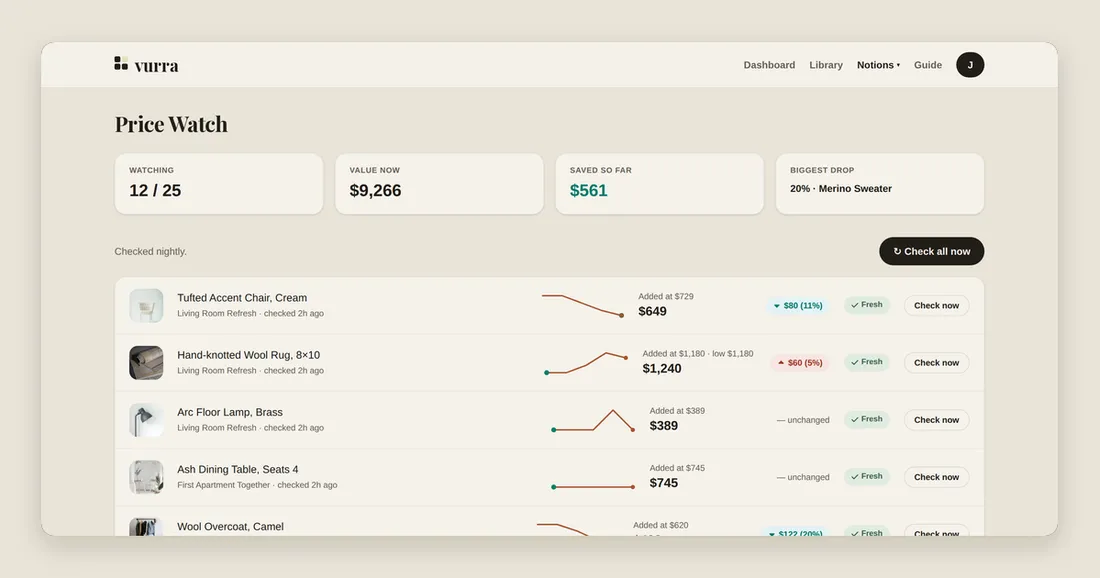
You mark an item as tracked. Vurra records the price at that moment as the baseline, then checks the product page on a schedule and keeps every result. The Price Watch page shows each tracked item with its baseline, its current price, its lowest seen, and a sparkline of the whole history, so a drop is measured against what the thing has actually cost, not against a banner.
When something falls, you hear about it. When it doesn’t, the row says “unchanged,” which is most rows most weeks and is genuinely the information you wanted.
There’s a deliberate cap on how many items you can watch at once. That’s not a paywall lever. It’s the selectivity point above. Tracking is for the coat the whole capsule hangs off and the rug you’d buy today at the right number, not for everything you’ve ever glanced at.
And when a page can’t be read, Vurra says so on the row rather than showing a stale number as though it were fresh.
A workable routine
- Put the project on a board and add everything, tracked or not.
- Turn tracking on for the three or four items that are expensive, non-urgent, and decided. You know you want it, you’re only waiting on the price.
- Don’t track things you need this week. There’s nothing to wait for.
- Don’t track cheap things. Saving 15% on a $12 item costs more attention than it returns.
- When an alert lands, check it against the history, not against the banner.
That’s the whole method. The point of tracking isn’t to squeeze every purchase. It’s to stop the two or three big ones from being decided by whichever Tuesday you happened to be looking.